
Choosing a Projector
Before buying a projector, you need to know two things:
How much room you have
Whether you’re using the Standard Throw Camera or the Short Throw Camera
Your camera type determines how far your projector needs to sit from the screen.
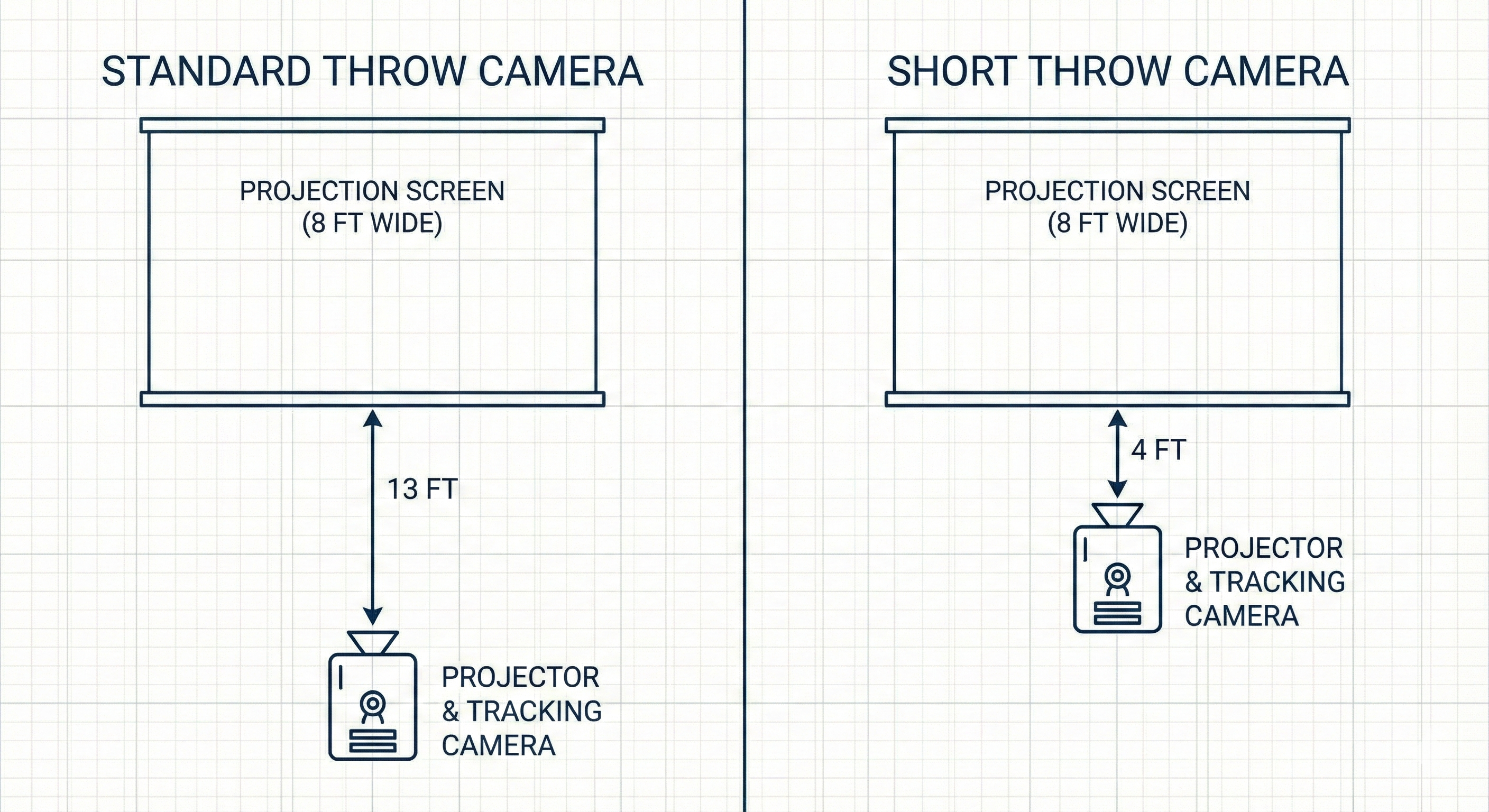
1. Standard Throw vs. Short Throw Camera
Standard Throw Camera
Must be placed 1.6 × the width of your screen away.
Example: For an 8-ft wide image → 8 × 1.6 = 13 ft from the screen
Short Throw Camera
Must be placed 0.5 × the width of your screen away.
Example: For an 8-ft wide image → 8 × 0.5 = 4 ft from the screen
➡️ Once you know which camera you’re using, choose a projector whose throw ratio matches that distance.
(Click here to see our FAQ on the Standard Throw camera vs the Short Throw camera.)
2. Projectors That Do NOT Work
Do NOT use Vankyo LED projectors.
They are not compatible.
LED Projector Warning
Avoid cheap, non-brand LED projectors (often found on Amazon/eBay).
They commonly:
Fake their brightness ratings
Are far dimmer than advertised
Do not work properly with the Smokeless Range
More about misleading brightness claims:
https://www.personalprojector.co.uk/blog/2017/10/covered-in-confusion-when-it-comes-to-understanding-lumens-and-brightness/
3. Projector Brands That We Recommend
These brands work well:
ViewSonic
Epson
BenQ
Optoma
Hitachi
InFocus
4. Minimum Required Specs
Your projector must have:
At least 2000 ANSI lumens
(Bigger screens may need 3600+ lumens.)Minimum resolution: 1280×720
(1080p is recommended.)Input that matches your PC (HDMI or VGA)
Input lag 50 ms or lower
Important Warnings
USB → Projector will NOT work. USB cannot output video to the projector for Smokeless Range.
HDMI-to-VGA adapters are risky. Some may work, others cause calibration issues or fail completely.
5. Projectors for the Standard Throw Camera
Choose any projector that meets our minimum specs and has a throw ratio close to 1.6:1.
Most projectors list a throw ratio range (e.g., 1.55–1.73:1).
As long as 1.6 is inside that range, the projector will sit in the same location as the camera.
Examples (Standard Throw)
1280×800 Resolution
ViewSonic PA503W
Optoma H184X
ViewSonic PX700HD / PX701HD
Optoma W335
1920×1080 Resolution (Recommended)
ViewSonic PX701HD
BenQ TH585
Optoma HD28HDR
6. Projectors for the Short Throw Camera
⚠️ Do NOT use Ultra Short-Throw 4K Laser Projectors
Examples: Optoma CinemaX P1/P2, VAVA 4K
These have very high input lag, which prevents proper calibration with our tracking system.
Compatible Short-Throw Options
1280×800 Resolution
ViewSonic PS600W
3700 lumens
0.5:1 throw ratio (perfect match)
Optoma W319ST
4000 lumens (good for 10–12 ft screens)
0.52:1 throw ratio (works with our 0.5:1 camera)
1920×1080 Resolution
Optoma GT1080HDR
3800 lumens
0.5:1 throw ratio
Optoma EH412STx
4000 lumens (ideal for 10–12 ft screens)
0.5:1 throw ratio
Summary
Choose Standard or Short Throw based on your space.
Match the projector’s throw ratio to the camera’s required distance.
Avoid cheap LED and ultra-short-throw 4K laser projectors.
Use a projector with 2000+ lumens, 720p minimum, and HDMI/VGA only.